Last week at the hardware store. I'm standing at the checkout, the cashier asks for my loyalty card. I dig out my phone, open the app, find the barcode tab, wait for it to load. The line behind me is getting longer. The app wants to show me an offer, a privacy notice popup, a hint about new features. Finally, the barcode appears. The cashier scans. Done.
On the way home I thought: next time I'll just take a screenshot of the barcode and drop it into my wallet. Saves the app, saves the searching, saves the stress. Got home, opened the app, navigated back to the barcode screen, pressed power + volume — screenshot. Checked the gallery. The area where the barcode was is blank. Completely white. The app blanked the code out of the screenshot.
That's Not a Bug, That's by Design
Both Android and iOS apps can deliberately prevent specific screen content from appearing in screenshots or screen recordings. On Android, the mechanism is called FLAG_SECURE — built for banking apps, password managers, sensitive medical data. On iOS, similar techniques exist via UIScreen.isCaptured or by hiding views the moment a screenshot is triggered.
These mechanisms make sense. With a banking app or a password manager, I don't want my account number or master password ending up by accident in a cloud-synced photo gallery. Fair enough.
For a loyalty card barcode, it makes less sense. The code identifies me as a customer, that's it. Still, a number of retailers — hardware chains, drugstores, supermarkets — use these protections to keep the barcode locked inside the app. The reason is obvious: if I have the code in my wallet, I never open the app. No more popups, no more offers, no more push notifications, no more tracking data points. From the retailer's perspective, that's a loss.
Workaround One: The Number Is Often Enough
Next time I shopped there, I tried something. Instead of having the barcode scanned, I just told the cashier my customer number — it was printed in plain text in the app, right under the barcode. He typed it in. Worked. Points credited.
That's not a trick, that's how these systems are actually built. The barcode is just a fast representation of the customer number. The number itself is the key to the account. Whether it comes from a barcode scanner or from manual entry, it ends up in the same field in the POS software.
In practice this means: write down or photograph the customer number once, drop it into a wallet pass or a password manager — and read it out at the till. Skips the app entirely. It works for most loyalty programs, because historically every one of them needed a typeable number as a fallback — for phone orders, for complaints, for exactly the case where the scanner doesn't cooperate.
Workaround Two: Photograph It with a Second Device
Some cards no longer show the number anywhere — only the barcode. Or the number is 18 digits long, which the cashier won't appreciate. For that case, there's the second trick:
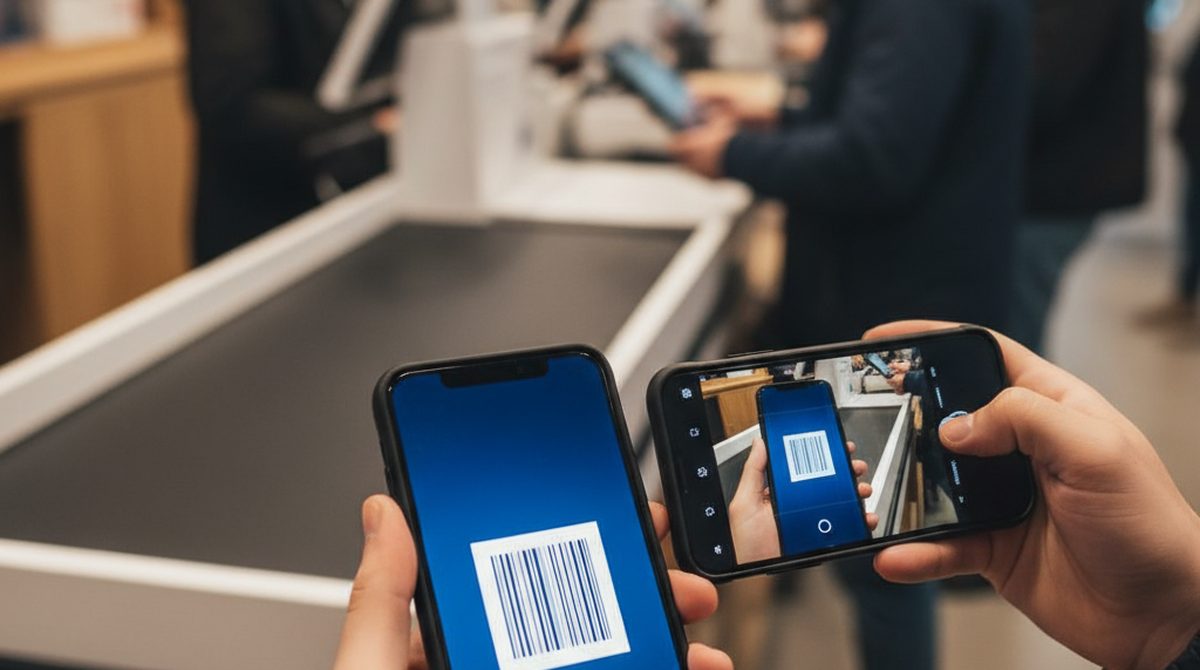
Take a second phone and photograph the barcode on the first. The screenshot block only triggers when the image is captured inside the device. An external camera sees the screen the way a human does — the protection doesn't apply. The photo doesn't have to be perfect. It just has to be readable enough to upload as an image into OtterWallet, have the barcode extracted, and turned into a clean wallet pass.
Variation: if there's no second phone around, an old laptop webcam works too. Or a partner's tablet. Whatever — two devices, one shows the code, the other captures it.
Why This Matters
The trend toward app-only loyalty cards is unmistakable. Public statistics are scarce, but anyone who pays attention sees it everywhere: drugstores, hardware stores, supermarkets, gas stations — the plastic card is disappearing, the app replaces it. From the retailer's side the logic is clear: an app is a direct communication channel, more valuable than any plastic card. Push notifications, location tracking, in-app advertising, cross-selling — all of that only works when the customer opens the app.
From the customer's side the app is often the opposite of practical. Three seconds to open, five seconds for the barcode to load, a few more to dismiss the popup. At a checkout with a queue behind you, that's a small eternity. The old plastic card was in your wallet within two seconds.
Wallet as the Middle Ground
A wallet pass is much closer to the old plastic-card experience than to the app: double-click the side button on iPhone, the screen brightens automatically, the barcode is in front of the scanner in half a second. No popups, no ads, no login screens.
Yes, the retailer loses the app touchpoint that way — but that's not my problem as a customer. My problem is the line behind me.
OtterWallet was built exactly for this case: enter the customer number as a barcode (or upload a photo of one), pick the format, and you get a clean Apple or Google Wallet pass. Works with Code 128, EAN, QR, Aztec, PDF417 — whatever your retailer happens to use.
Bottom Line
If your loyalty card lives only inside the app and blocks screenshots: that's deliberate, not coincidence. The retailer wants to keep you in the app. But at the checkout, what matters is the customer number, not the barcode — and that's something you can write down, or capture once with a second device. Both work, both are legal, both get you where you actually wanted to go: the card is in your wallet, the app stays closed, the queue doesn't get any longer.
Sometimes the simplest tricks are the best ones.